Bylaws
Bylaws is an architectural linter for Swift.
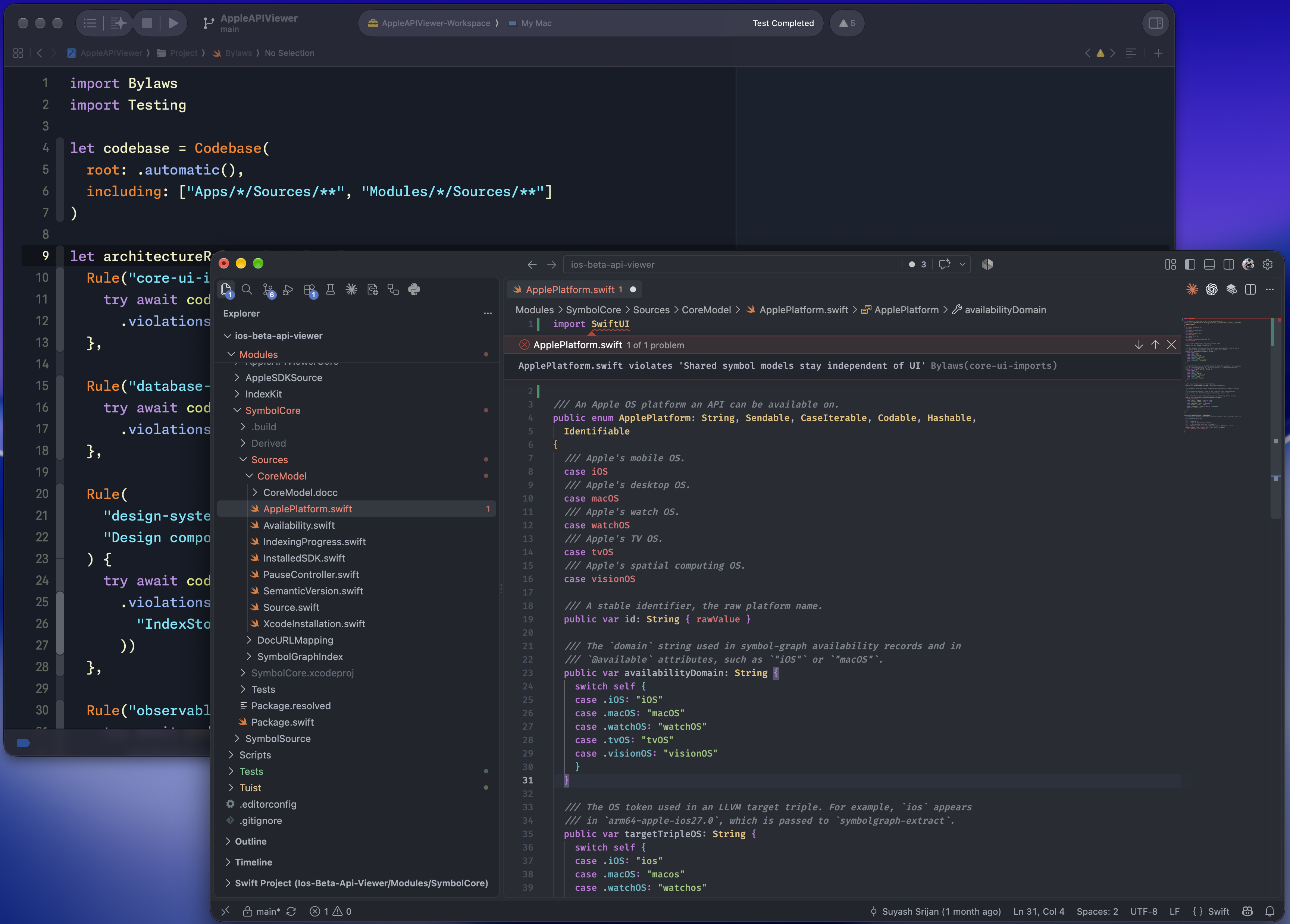
Read the documentation for guides and the API reference.
Why Bylaws?
In any small project, the same few people make most of the architectural decisions, such as which modules should depend on another and which APIs could access stored data. As the project grows, a new person making a change may not know every earlier decision. For example, a new dependency can look reasonable on its own and pass review even when it breaks an existing agreed-upon boundary.
You can catch these changes through code review, if you recognise the problem from experience or know which design document to consult. In today's world, as we rely more on AI to write and review code, we also need to check that its changes follow the project's architectural decisions. We could give an agent those decisions through design documents or AGENTS.md, but it might apply them inconsistently from one task to the next.
With Bylaws, you can write these types of checks in Swift and run them with your tests or from the command line. When code breaks a rule, Bylaws shows you where it happened!
Enforce a module boundary
Let's say Checkout reads stored data through an API declared in Domain, and Persistence provides the implementation. Checkout and Persistence may import Domain, but Checkout must use the Domain API to keep it independent of the storage implementation.
Swift allows CheckoutViewModel.swift to import Persistence if your build
configuration permits that dependency. To enforce the boundary between these
modules, you can add the following to a Bylaws.swift file at the project root:
import Bylaws
import Testing

let app = Codebase(root: .automatic(), including: ["Sources/**"])

let appLayers = Layering(
  Layer("Domain", files: ["Sources/Domain/**"]),
  Layer(
    "Persistence",
    files: ["Sources/Persistence/**"],
    mayImport: ["Domain"]
  ),
  Layer("Checkout", files: ["Sources/Checkout/**"], mayImport: ["Domain"])
)

let projectRules: [Rule] = [
  Rule("feature-boundaries", "Modules follow their declared dependencies") {
    try await app.checkLayering(appLayers)
  },
]
The import restrictions apply between the layers listed here. Imports of other modules, such as Foundation, remain permitted.
When you run bylaws lint, it points to the import that crossed the boundary:
/path/to/App/Sources/Checkout/CheckoutViewModel.swift:2:8: error: import Persistence violates 'Modules follow their declared dependencies' [feature-boundaries]
Checked 1 rule: 1 violation.
An enforced rule fails the run when it finds violations, but you can make a rule advisory to see its violations without failing your checks.
You can run these rules from the command line or use the same Rule values in a
Swift Testing target. If these folders live inside one app target, the compiler
index can enforce the same boundary without module imports.
Practical rules
You can add these rules to the projectRules array above after changing the
paths and type names to match your project.
Keep diagnostic output in the logging layer
You can require application code to use your logger so its filtering and
formatting apply consistently. This rule reports calls named print,
debugPrint or NSLog outside Sources/Logging, including calls in
initialisers and property values:
Rule("central-logging", "Console output goes through the logging layer") {
  try await app.calls
    .outside("Sources/Logging")
    .violations(matching: .references("print", "debugPrint", "NSLog"))
}
Require a shared base class for screen models
If your app keeps shared screen behaviour in BaseScreenModel, a class that
conforms to ScreenModel should inherit that behaviour. You can check this even
when the conformance comes from an extension or an intermediate class:
Rule("screen-model-base", "Screen models inherit BaseScreenModel") {
  try await app.classes
    .where(.conforms(to: "ScreenModel") && !.named("BaseScreenModel"))
    .violations(of: .inherits(from: "BaseScreenModel"))
}
Use domain types for identifiers
Distinct CustomerID and OrderID types let the compiler catch an order ID
passed where a customer ID is required. This rule reports properties under
Sources/Domain whose names end in ID and whose type annotations specify
String, Int or UUID:
Rule("domain-identifiers", "Identifiers use domain types") {
  try await app.properties
    .under("Sources/Domain")
    .suffixed("ID")
    .violations(matching: .hasType("String", "Int", "UUID"))
}
Give stored enum cases explicit values
Renaming a string-backed enum case also changes its implicit raw value. If your
app saves those values, you can require explicit raw values so a rename can keep
the stored format unchanged. This rule checks Codable enums under
Sources/Storage:
Rule("stored-enum-values", "Stored enum cases declare explicit values") {
  try await app.enums
    .under("Sources/Storage")
    .where(.declaresInheritance("String") && .conforms(to: "Codable"))
    .violations(of: Matcher<Enum>("declare explicit raw values") { anEnum in
      anEnum.cases.allSatisfy { $0.rawValue != nil }
    })
}
Keep preferences access in one type
You can keep functions that call UserDefaults inside PreferencesStore, where
the app manages its preference keys and default values:
Rule("preferences-access", "Functions that call UserDefaults belong to PreferencesStore") {
  try await app.functions
    .where(.calls("UserDefaults"))
    .violations(of: Matcher<Function>("belong to PreferencesStore") { function in
      function.enclosingTypeName == "PreferencesStore"
    })
}
The declaration guide shows separate queries for calls in property initialisers and accessors.
Keep each feature's files in the right folders
You can require each feature to contain exactly Models, ViewModels and
Views as child folders, with a violation for any missing or extra folder:
Rule("feature-folders", "Features contain Models, ViewModels and Views") {
  try await app.checkFolderLayout(
    matching: "Sources/App/*",
    containing: ["Models", "ViewModels", "Views"]
  )
}
A separate rule checks where the types belong:
Rule("view-model-folders", "View models belong in ViewModels") {
  try await app.types.under("Sources/App").suffixed("ViewModel")
    .violations(outsidePaths: "Sources/App/*/ViewModels/**")
}
The folder guide includes checks for views and models with examples for a module that shares folders across features.
You can also set permitted references and check cycles between file groups or require corresponding types, such as a view model for each feature view and a test type for each repository.
Keep package dependencies consistent with imports
You can check that dependencies between targets in the same Package.swift
match their imports. This rule reports a missing dependency when a target
imports a module it hasn't declared or an unused dependency when the target no
longer imports it.
Define a codebase beside app that includes both application and test sources:
let packageCodebase = Codebase(
  root: .automatic(),
  including: ["Sources/**", "Tests/**"]
)
If your targets use other directories, add those paths to including so their
imports are checked too. Then add this rule to projectRules:
Rule("package-dependencies", "Package.swift matches source imports") {
  try await packageCodebase.checkPackageDependencies()
}
Bylaws reports warnings for targets it cannot check.
The rule cookbook also covers protocol requirements, SwiftUI state, lifecycle calls and compiler-resolved references.
What a rule can check
You can write rules for your project's structure, dependencies and declarations and most of it can run without a build.
For checks that need compiler information, such as finding references between
layers in one module, use the optional BylawsIndex product after a build.
What Bylaws reads explains which checks can use only the source and which need
the compiler's index.
Get started
Requirements
- Swift: 6.2 or later, included with Xcode 26 or later
- Libraries: iOS 13 or later, macOS 14 or later or Linux
- CLI and language server: macOS 14 or later or Linux
Choose how to run rules
| Workflow | Use it when | Result |
|---|---|---|
bylaws CLI |
The rules must run before a build or from CI | Violations in Xcode, GitHub, JSON or SARIF format |
| Swift Testing | The rules belong with the test suite or need the full Swift language | Test cases with source diagnostics in Xcode |
[!NOTE]
You can run the same rules from the CLI and a test target if they use the CLI's supported Swift subset. The getting started guide explains how to share them, while the SwiftPM plugins, Bazel target and editor integrations sections cover the requirements for those workflows.
Run rules from the command line
Install the bylaws command using the CLI setup guide. Save the opening
example as Bylaws.swift at the project's root, then run:
bylaws lintIf you want to start with warning-only rules instead, run bylaws init in a
project that has no Bylaws.swift file. Set a rule's enforcement to .enforced
when its violations should fail the check. You can also record a baseline to
permit existing violations while rejecting new ones.
Running rules from the CLI covers discovery, shared rule packages, baselines and CI.
Run rules with Swift Testing
Add the package and the Bylaws product to a test target:
dependencies: [
  .package(
    url: "https://github.com/theblixguy/swift-bylaws.git",
    from: "0.3.1",
    traits: []
  )
],
targets: [
  .testTarget(
    name: "AppTests",
    dependencies: [
      .product(name: "Bylaws", package: "swift-bylaws")
    ]
  )
]
Set traits: [] if you only use Bylaws in tests or omit it if you also use the
plugins, CLI or language server.
Save the module-boundary example and its projectRules array in
Tests/AppTests/Bylaws.swift, then add this test in
Tests/AppTests/ArchitectureTests.swift:
import Bylaws
import Testing

@Test("Code follows the architecture rules", arguments: projectRules)
func architecture(_ rule: Rule) async throws {
  try await rule.report()
}
Run the rules with the rest of the tests:
swift testRule violations fail the test and report the affected file and line. If you mark
a rule as .advisory, its violations appear as warnings instead.
To run the same rules from the CLI, pass the rules file to bylaws lint:
bylaws lint --rules Tests/AppTests/Bylaws.swiftYou can also create one test case per matching declaration, as shown in the
declaration guide. To keep a shared rules file at the project root for plugins
and editors, use test discovery instead of compiling the rules as part of the
test target. Use discovery for files created by bylaws init too, as those
files use CLI syntax that cannot compile unchanged in a test target.
Run checks during development
Use the SwiftPM plugins
You can use either plugin without installing bylaws separately, and your rules
file can import shared rules from other package dependencies.
Use the plugins for those imports, as the standalone CLI does not resolve the
package dependencies.
| Plugin | Use it when | How it runs |
|---|---|---|
Command plugin (BylawsPlugin) |
You want a separate local or CI check, need to record a baseline or run rules that use compiler data | You run swift package bylaws when needed |
Build plugin (BylawsBuildToolPlugin) |
Rule violations should stop a SwiftPM build | SwiftPM runs the check before compiling the attached target |
You can use both plugins to check rules during builds and record baselines
separately. For projects without a Swift package, use the standalone
bylaws lint command with local rules files.
Run the command plugin
Add Bylaws to your package dependencies and put Bylaws.swift at the package
root. The command plugin is available without attaching it to a target:
swift package --allow-writing-to-package-directory bylawsThe permission flag lets the plugin write a baseline when you request one. You
can pass lint options after bylaws, such as --only feature-boundaries. If
any of your rules use the compiler index, build the project before you run the
plugin.
Run the build plugin
Add Bylaws to your package dependencies, put Bylaws.swift at the package root
and attach BylawsBuildToolPlugin to one target that your build includes:
.target(
  name: "App",
  plugins: [
    .plugin(name: "BylawsBuildToolPlugin", package: "swift-bylaws"),
  ]
)
Build with this flag so SwiftPM runs the checks on each build:
swift build --disable-build-manifest-caching[!IMPORTANT]
The flag is required because SwiftPM can otherwise reuse a build plan and skip checks after a source edit.
The plugin checks rules against any recorded baselines and fails the build on enforced violations. Attaching it to several targets repeats the package-wide check, so attach it once per package. Use the command plugin to record baselines, see advisory warnings or run rules that need compiler data.
The build plugin works with SwiftPM command-line builds but cannot be attached directly to an Xcode project target. Build-tool plugin setup covers the supported builds and rule restrictions.
Run checks with Bazel
You can run Bylaws as a separate local or CI check with Bazel 7.1 or later on macOS and Linux.
Add the dependency from the Bazel Central Registry to MODULE.bazel:
bazel_dep(name = "swift-bylaws", version = "0.3.1")Put Bylaws.swift at the workspace root, then run:
bazel run @swift-bylaws//:bylaws -- lintTo check rules during bazel build, add a Bazel lint target. It checks the
declared source files, including generated files, and produces a JSON report.
Bazel can reuse successful checks from its local or remote cache. You can also
check Bazel target dependencies using an exported graph, without a
Package.swift.
Show violations in an editor
Install the Bylaws integration for your editor and follow its setup guide: VS
Code or Cursor, Zed, Neovim or Emacs. The guides cover installation of
the bylaws-lsp executable as well as the editor settings.
Open a project with a Bylaws.swift file to see violations as you edit Swift
code, including changes you haven't saved. The editor uses the same rules and
baseline as the CLI.
Compiler-index rules check the code from a build rather than unsaved edits. After saving and rebuilding your project, restart the language server to refresh those results.
How it compares
If you use SwiftLint for style and correctness checks, you can add Bylaws to enforce your project's architecture rules.
Run and integrate rules
| Feature | Bylaws | Harmonize | SwiftLint |
|---|---|---|---|
| Run rules | Swift Testing or CLI | Swift Testing, XCTest or Quick | CLI |
| SwiftPM command plugin | swift package bylaws |
None | swift package plugin swiftlint |
| Build-tool plugin | SwiftPM (build flag required) | None | SwiftPM and Xcode |
| Bazel integration | bazel run and a cacheable lint target for source checks |
No bundled integration | bazel run |
| Editor integration | Xcode test diagnostics and live LSP checks in VS Code, Cursor, Zed, Neovim and Emacs | Test diagnostics in Xcode | Xcode build diagnostics and community editor extensions such as SwiftLint for VS Code |
| Share rules | Swift packages for tests and both plugins | Swift helpers in test dependencies | Shared YAML or a custom binary for Swift rules |
| Rules per folder or module | Automatic folder discovery, exclusions and overrides with a reason | Query filters and file exclusions | Nested configuration files |
| Accept existing violations | Recorded baseline, checked for entries that no longer apply | Hand-written list of names, checked for entries that no longer apply | Recorded JSON baseline |
| Warning-only rules | Advisory rules in tests and the CLI | Severity metadata with test failures by default | Configurable warning and error levels |
| Report results | Test failures, Xcode, GitHub, JSON and SARIF, with CLI report files (--output) |
Test failures and JSON | Xcode, GitHub, JSON, SARIF and other formats |
| Automatic fixes | None | None | --fix for supported rules |
What rules can check
| Feature | Bylaws | Harmonize | SwiftLint |
|---|---|---|---|
| Custom rules | Swift queries and matchers | Swift queries and assertions | Regex in YAML or Swift rules in a custom build |
| Declarations, calls and type annotations | Source model and SwiftSyntax access | Source model and SwiftSyntax access | SwiftSyntax in Swift custom rules |
| Inheritance and conformance | Transitive source queries, including aliases and extensions | Direct and transitive source queries | Swift custom rules |
| Macro uses and call argument labels | Query APIs | SwiftSyntax access where query APIs do not cover a check | Swift custom rules |
| Allowed imports between layers | Declare layers and allowed imports | Write checks over imports | Write custom rules |
| Layer boundaries within a module | Folder-based layers with compiler-resolved references | None | None |
| SwiftPM manifest | Query targets, products, platforms, traits and build settings | None | None |
| SwiftPM target dependencies | Find unused and undeclared target dependencies | None | Import rules without a local target-dependency check |
| Bazel target dependencies | Direct/transitive dependencies and build settings from configured cquery exports |
No built-in graph queries | No built-in graph queries |
| Import graph and dependency stability | Graph queries and stability checks | None | None |
| Compiler data | Optional index for resolved references and conformances | Source syntax model | analyze with a clean build log |
Benchmarks
These benchmarks compare how long Bylaws and SwiftLint take to check ten corresponding source properties in the same files across five open-source Swift projects. The times below are in seconds and exclude compilation.
| Project | Swift files | Lines | Bylaws | SwiftLint | |||
|---|---|---|---|---|---|---|---|
bylaws lint (s) |
swift test uncached (s) |
swift test cached (s) |
--no-cache (s) |
Cached (s) | |||
| RxSwift | 264 | 30,294 | 0.06 | 1.27 | 0.75 | 0.15 | 0.10 |
| Realm | 130 | 76,507 | 0.14 | 3.91 | 0.84 | 0.34 | 0.11 |
| Kickstarter | 1,631 | 261,712 | 0.30 | 5.87 | 1.09 | 1.28 | 0.94 |
| WordPress | 3,260 | 428,267 | 0.45 | 8.13 | 1.35 | 1.28 | 0.51 |
| Firefox | 3,013 | 407,427 | 0.51 | 7.88 | 1.47 | 2.80 | 2.02 |
Documentation
- Getting started
- Rule cookbook
- Combine checks and match declaration members
- Running rules from the CLI
- Inspect a rule's selections
- Running rules during builds
- What Bylaws reads
- Editor setup
- Frequently asked questions
Use GitHub Issues for bugs, questions and proposed rules.
Licence
Bylaws is available under the MIT licence. See LICENSE.
Languages
Maintainers
