Upstream abandoned free, offline distribution for an authenticated commercial product. This fork rejects that decision and preserves unrestricted local use.

Periphery
A tool to identify unused code in Swift projects.
Now I am become Delete, the destroyer of codes.


Contents
- Installation
- How To Use
- Analysis
- Comment Commands
- Xcode Integration
- Excluding Files
- Continuous Integration
- Build Systems
- Platforms
- Troubleshooting
- Known Bugs
- Credits
- Releases
- Sponsors

Installation
Homebrew
brew install agoodkind/tap/peripheryMint
mint install agoodkind/peripheryBazel
Select a published fork release in the consuming project's MODULE.bazel:
bazel_dep(name = "periphery", version = "3.8.0", dev_dependency = True)
git_override(
    module_name = "periphery",
    remote = "https://github.com/agoodkind/periphery.git",
    tag = "3.8.0-agoodkind.7",
)
use_repo(use_extension("@periphery//bazel:generated.bzl", "generated"), "periphery_generated")
The override selects this fork directly. Change the tag to select another published release.
See Bazel below for usage instructions.
How To Use
The scan Command
The scan command is Periphery's primary function. To begin a guided setup, change to your project directory and run:
periphery scan --setupThe guided setup will detect your project type and configure a few options. After answering a few questions, Periphery will print out the full scan command and execute it.
The guided setup is only intended for introductory purposes. Once you are familiar with Periphery, you can try some more advanced options, all of which can be seen with periphery help scan.
To get the most from Periphery, it’s important to understand how it works. Periphery first builds your project; it does this to generate the “index store”. The index store contains detailed information about the declarations (class, struct, func, etc.) in your project and their references to other declarations. Using this store, Periphery builds an in-memory graph of the relational structure of your project, supplementing it with additional information obtained by parsing each source file. Next, the graph is mutated to make it more suitable for detecting unused code, e.g., marking your project’s entry points. Finally, the graph is traversed from its roots to identify unreferenced declarations.
[!TIP] The index store only contains information about source files in the build targets compiled during the build phase. If a given class is only referenced in a source file that was not compiled, then Periphery will identify the class as unused. It's important to ensure you build all the targets you expect to contain references. For an Xcode project, this is controlled using the
--schemesoption. For a Swift package, all targets are built automatically.
If your project consists of one or more standalone frameworks that do not also contain some kind of application that consumes their interfaces, you need to tell Periphery to assume that all public declarations are used with the --retain-public option.
For projects that are mixed Objective-C & Swift, it's highly recommended you read about the implications this can have on your results.
Configuration
Once you've settled upon the appropriate options for your project, you may wish to persist them in a YAML configuration file. The simplest way to achieve this is to run Periphery with the --verbose option. Near the beginning of the output, you will see the [configuration:begin] section with your configuration formatted as YAML below. Copy & paste the configuration into .periphery.yml in the root of your project folder. You can now simply run periphery scan and the YAML configuration will be used.
Analysis
The goal of Periphery is to report instances of unused declarations. A declaration is a class, struct, protocol, function, property, constructor, enum, typealias, associatedtype, etc. As you'd expect, Periphery can identify simple unreferenced declarations, e.g., a class that is no longer used anywhere in your codebase.
Periphery can also identify more advanced instances of unused code. The following section explains these in detail.
Function Parameters
Periphery can identify unused function parameters. Instances of unused parameters can also be identified in protocols and their conforming declarations, as well as parameters in overridden methods. Both of these scenarios are explained further below.
Protocols
An unused parameter of a protocol function will only be reported as unused if the parameter is also unused in all implementations.
protocol Greeter {
    func greet(name: String)
    func farewell(name: String) // 'name' is unused
}

class InformalGreeter: Greeter {
    func greet(name: String) {
        print("Sup " + name + ".")
    }

    func farewell(name: String) { // 'name' is unused
      print("Cya.")
    }
}
[!TIP] You can ignore all unused parameters from protocols and conforming functions with the
--retain-unused-protocol-func-paramsoption.
Overrides
Similar to protocols, parameters of overridden functions are only reported as unused if they're also unused in the base function and all overriding functions.
class BaseGreeter {
    func greet(name: String) {
        print("Hello.")
    }

    func farewell(name: String) { // 'name' is unused
        print("Goodbye.")
    }
}

class InformalGreeter: BaseGreeter {
    override func greet(name: String) {
        print("Sup " + name + ".")
    }

    override func farewell(name: String) { // 'name' is unused
        print("Cya.")
    }
}
Foreign Protocols & Classes
Unused parameters of protocols or classes defined in foreign modules (e.g. Foundation) are always ignored since you do not have access to modify the base function declaration.
fatalError Functions
Unused parameters of functions that simply call fatalError are also ignored. Such functions are often unimplemented required initializers in subclasses.
class Base {
    let param: String

    required init(param: String) {
        self.param = param
    }
}

class Subclass: Base {
    init(custom: String) {
        super.init(param: custom)
    }

    required init(param: String) {
        fatalError("init(param:) has not been implemented")
    }
}
Protocols
A protocol that is conformed to by an object is not truly used unless it's also used as an existential type or to specialize a generic method/class. Periphery is able to identify such redundant protocols whether they are conformed to by one or even multiple objects.
protocol MyProtocol { // 'MyProtocol' is redundant
    func someMethod()
}

class MyClass1: MyProtocol { // 'MyProtocol' conformance is redundant
    func someMethod() {
        print("Hello from MyClass1!")
    }
}

class MyClass2: MyProtocol { // 'MyProtocol' conformance is redundant
    func someMethod() {
        print("Hello from MyClass2!")
    }
}

let myClass1 = MyClass1()
myClass1.someMethod()

let myClass2 = MyClass2()
myClass2.someMethod()
Here we can see that despite both implementations of someMethod being called, at no point does an object take on the type of MyProtocol. Therefore, the protocol itself is redundant, and there's no benefit from MyClass1 or MyClass2 conforming to it. We can remove MyProtocol along with each redundant conformance and just keep someMethod in each class.
Just like a normal method or property of an object, individual properties and methods declared by your protocol can also be identified as unused.
protocol MyProtocol {
    var usedProperty: String { get }
    var unusedProperty: String { get } // 'unusedProperty' is unused
}

class MyConformingClass: MyProtocol {
    var usedProperty: String = "used"
    var unusedProperty: String = "unused" // 'unusedProperty' is unused
}

class MyClass {
    let conformingClass: MyProtocol

    init() {
        conformingClass = MyConformingClass()
    }

    func perform() {
        print(conformingClass.usedProperty)
    }
}

let myClass = MyClass()
myClass.perform()
Here we can see that MyProtocol is itself used and cannot be removed. However, since unusedProperty is never called on MyConformingClass, Periphery can identify that the declaration of unusedProperty in MyProtocol is also unused and can be removed along with the unused implementation of unusedProperty.
Enumerations
Along with being able to identify unused enumerations, Periphery can also identify individual unused enum cases. Plain enums that are not raw representable, i.e., that don't have a String, Character, Int, or floating-point value type, can be reliably identified. However, enumerations that do have a raw value type can be dynamic, and therefore must be assumed to be used.
Let's clear this up with a quick example:
enum MyEnum: String {
    case myCase
}

func someFunction(value: String) {
    if let myEnum = MyEnum(rawValue: value) {
        somethingImportant(myEnum)
    }
}
There's no direct reference to the myCase case, so it's reasonable to expect it might no longer be needed. However, if it were removed, we can see that somethingImportant would never be called if someFunction were passed the value of "myCase".
Assign-only Properties
Properties that are assigned but never used are identified as such, e.g.:
class MyClass {
    var assignOnlyProperty: String // 'assignOnlyProperty' is assigned, but never used

    init(value: String) {
        self.assignOnlyProperty = value
    }
}
In some cases this may be the intended behavior; therefore, you have a few options available to silence such results:
- Retain individual properties using Comment Commands.
- Retain all assign-only properties by their type with
--retain-assign-only-property-types. Given types must match their exact usage in the property declaration (sans optional question mark), e.g.String,[String],Set<String>. Periphery is unable to resolve inferred property types, therefore in some instances, you may need to add explicit type annotations to your properties. - Disable assign-only property analysis entirely with
--retain-assign-only-properties.
Redundant Public Accessibility
Declarations that are marked public yet are not referenced from outside their home module are identified as having redundant public accessibility. In this scenario, the public annotation can be removed from the declaration. Removing redundant public accessibility has a couple of benefits:
- It helps reduce the public surface area of your modules.
- In Whole Module Compilation mode, Swift can infer
finalby automatically discovering all potentially overriding declarations.finalclasses are better optimized by the compiler.
This analysis can be disabled with --disable-redundant-public-analysis.
Unused Imports
Periphery can only detect unused imports of targets it has scanned. It cannot detect unused imports of other targets because the Swift source files are unavailable and uses of @_exported cannot be observed. @_exported is problematic because it changes the public interface of a target such that the declarations exported by the target are no longer necessarily declared by the imported target. For example, the Foundation target exports Dispatch, among other targets. If any given source file imports Foundation and references DispatchQueue but no other declarations from Foundation, then the Foundation import cannot be removed as it would also make the DispatchQueue type unavailable. To avoid false positives, therefore, Periphery only detects unused imports of targets it has scanned.
Periphery will likely produce false positives for targets with mixed Swift and Objective-C, as Periphery cannot scan the Objective-C files. It is recommended, therefore, to disable unused import detection for projects with a significant amount of Objective-C or manually exclude the mixed language targets from the results.
Platform Conditionals
The index store only describes the platform Periphery built for, so code that is only used on another platform would be reported as unused. To avoid these false positives, Periphery retains:
- Declarations marked
@available(<platform>, unavailable)(e.g.@available(tvOS, unavailable)), along with their members.@available(*, unavailable),swiftand*ApplicationExtensionplatforms are not affected. - Periphery reads every branch of an
#ifblock conditioned onos(),targetEnvironment(),arch(), orcanImport(), including#elsebranches, and matches declarations against the names of functions the code calls, properties it accesses, and types it references in those branches. Periphery does not count a declaration's name as a reference and still reports unused declarations inside the block. When only one declaration in the scanned code has a matching name, Periphery retains it. When several declarations share that name, Periphery retains only matching members of the stated receiver types if every use in those branches states its receiver type. Periphery recognizesTypeName.member,TypeName().member, and receiver variables with a type annotation in the same branch, such aslet value: TypeName. If any use omits the receiver type in the branch, such asvalue.member()whenvaluehas its declaration outside the branch, Periphery retains every declaration with that name.
This can be disabled with --disable-platform-conditional-retention. Other conditions, such as #if DEBUG, are not covered, see Code referenced within a preprocessor macro conditional branch is unused.
Objective-C
Periphery cannot analyze Objective-C code since types may be dynamically typed.
By default, Periphery does not assume that declarations accessible by the Objective-C runtime are in use. If your project is a mix of Swift & Objective-C, you can enable this behavior with the --retain-objc-accessible option. Swift declarations that are accessible by the Objective-C runtime are those that are explicitly annotated with @objc or @objcMembers, and classes that inherit NSObject either directly or indirectly via another class.
Alternatively, the --retain-objc-annotated option can be used to only retain declarations that are explicitly annotated with @objc or @objcMembers. Types that inherit NSObject are not retained unless they have explicit annotations. This option may uncover more unused code, but with the caveat that some of the results may be incorrect if the declaration is used in Objective-C code. To resolve these incorrect results, you must add an @objc annotation to the declaration.
Codable
Swift synthesizes additional code for Codable types that is not visible to Periphery and can result in false positives for properties not directly referenced from non-synthesized code. If your project contains many such types, you can retain all properties on Codable types with --retain-codable-properties. Alternatively, you can retain properties only on Encodable types with --retain-encodable-properties.
If Codable conformance is declared by a protocol in an external module not scanned by Periphery, you can instruct Periphery to identify the protocols as Codable with --external-codable-protocols "ExternalProtocol".
Equatable and Hashable
Swift synthesizes additional code for Equatable and Hashable types that is not visible to Periphery and can result in false positives for properties not directly referenced from non-synthesized code. If your project contains many such types, you can retain all properties on Equatable types with --retain-equatable-properties, or all properties on Hashable types with --retain-hashable-properties. The Equatable option also retains properties on Hashable types because Hashable refines Equatable.
XCTestCase
Any class that inherits XCTestCase is automatically retained along with its test methods. However, when a class inherits XCTestCase indirectly via another class, e.g., UnitTestCase, and that class resides in a target that isn't scanned by Periphery, you need to use the --external-test-case-classes UnitTestCase option to instruct Periphery to treat UnitTestCase as an XCTestCase subclass.
Interface Builder
If your project contains Interface Builder files (such as storyboards and XIBs), Periphery will take these into account when identifying unused declarations. Periphery parses these files to identify which classes, @IBOutlet properties, @IBAction methods, and @IBInspectable properties are actually referenced. Only those members that are connected in the Interface Builder file will be retained. Any @IB* members that are declared but not connected will be reported as unused.
Files inside Xcode 16+ synchronized folders (PBXFileSystemSynchronizedRootGroup) are supported: they are collected per target, honouring each target's membership exceptions.
SPI (System Programming Interface)
Swift's @_spi attribute marks declarations as pseudo-private, making them accessible only to clients that explicitly import the SPI. While these declarations are technically public, they're intended for internal or restricted use.
When using --retain-public for framework projects, all public declarations are retained, including those marked with @_spi. However, you may want to check for unused code within specific SPIs. The --no-retain-spi option allows you to specify which SPIs should be checked for unused code even when --retain-public is enabled.
For example, with --retain-public --no-retain-spi Internal, Periphery will:
- Retain regular
publicdeclarations - Retain
@_spi(Testing) publicdeclarations (different SPI) - Check
@_spi(Internal) publicdeclarations for unused code
This is particularly useful for internal SPIs that should be audited for unused code while still retaining the framework's public API.
Localized Strings
Periphery can identify unused localized strings in String Catalog (.xcstrings) files. Catalogues are discovered from Xcode target resources (including synchronized folders), SPM target resources, Bazel AppleResourceInfo and the xcstrings key of a generic project configuration. This analysis can be disabled with --disable-unused-localized-string-analysis (or disable_unused_localized_string_analysis: true in .periphery.yml).
A key is considered used when a static string literal with the same value is:
- Passed to a parameter of type
LocalizedStringKey,LocalizedStringResource,String.LocalizationValue,DisplayRepresentationorIntentDescription(including optionals, arrays and variadics). The parameter type is resolved from the index store, so this covers SwiftUI initializers and modifiers (Text,Button,Label,Toggle,Section,navigationTitle, ...),String(localized:), as well as your own functions and initializers. A literal passed to a plainStringparameter (e.g.Label("title", systemImage: "star")'ssystemImage) is not considered a key. - Passed to
NSLocalizedString,Bundle.localizedString(forKey:),LocalizedStringKey(_:),LocalizedStringResource(_:)orText(_:), matched by name. - Assigned to, returned from, or used as the default value of a declaration annotated with one of the types above (e.g.
static let title: LocalizedStringResource = "key").
When the called function cannot be resolved (e.g. calling a closure, an enum case constructor or an Objective-C method), the literals passed to it are conservatively considered keys. Ternaries and array literals of string literals are looked through.
Catalogues matching the --localized-string-catalog-exclude globs (localized_string_catalog_exclude in .periphery.yml) are not analysed. By default **/InfoPlist.xcstrings and **/AppShortcuts.xcstrings are excluded, since their keys are consumed by the system rather than referenced from Swift source. Setting the option replaces the default list, so include these patterns if you add your own:
localized_string_catalog_exclude:
  - "**/InfoPlist.xcstrings"
  - "**/AppShortcuts.xcstrings"
  - "**/DefaultCategories.xcstrings"
[!NOTE]
- Periphery matches keys regardless of the
table:andbundle:arguments. A static literal anywhere in the scanned code retains the matching key in every catalog.- Periphery does not detect keys referenced through Xcode 26+ generated symbols, such as
Text(.myKey).- Periphery matches interpolated literals to catalog keys with a format specifier in place of each interpolation. For example,
Text("count \(n) items")retainscount %lld items. Periphery does not check whether the specifier matches the interpolated type.- Periphery cannot resolve keys built from runtime values, such as
LocalizedStringKey(name),String.LocalizationValue(name),NSLocalizedString(name, comment:), orBundle.localizedString(forKey: name, ...). For a.modulebundle, Periphery retains matching keys in the calling module. For an unknown bundle, it retains matching keys in every catalog. A key without a literal prefix matches every key. Periphery warns when an unknown bundle and an unprefixed key prevent unused catalog findings. For a main bundle lookup, Periphery excludes SwiftPM catalogs that belong to separately declared resource bundles; other project drivers retain matching keys in every catalog.- When a runtime key expression starts with a string literal, such as
LocalizedStringKey("settings." + name), Periphery retains only keys that start with that literal. The--verboseoutput lists each runtime key call site, including calls with literal prefixes.- Target membership determines which module owns a catalog. Periphery uses the SwiftPM target
resourceslist and target directory, or the Xcode target resources build phase and synchronized folders. Periphery does not report keys from catalogs without target membership, including catalogs listed in a generic project configuration or found by a Bazel scan. The--verboseoutput lists each such catalog.Periphery can exclude a dedicated catalog of runtime keys with
localized_string_catalog_exclude. Conditional expressions with static literals also let Periphery identify each possible key:var message: String { if condition { String(localized: "message_success") } else { String(localized: "message_failure") } }
Comment Commands
For whatever reason, you may want to keep some unused code. Source code comment commands can be used to ignore specific declarations and exclude them from the results.
An ignore comment command can be placed directly on the line above any declaration to ignore it and all descendent declarations:
// periphery:ignore
class MyClass {}
You can also ignore specific unused function parameters:
// periphery:ignore:parameters unusedOne,unusedTwo
func someFunc(used: String, unusedOne: String, unusedTwo: String) {
    print(used)
}
The // periphery:ignore:all command can be placed at the top of the source file to ignore the entire contents of the file. Note that the comment must be placed above any code, including import statements.
Comment commands also support trailing comments following a hyphen so that you can include an explanation on the same line:
// periphery:ignore - explanation of why this is necessary
class MyClass {}
Overriding Result Kind and Location
In generated code scenarios where the generated code is too low-level or obtuse to be directly reported as unused, you can override the kind and/or location of a result to provide a more meaningful report:
// periphery:override kind="MyCustomThing" location="path/to/file.swift:42:1"
func generatedFunction() {}
The kind override allows you to specify a custom kind that will be shown in the result. The location override uses the format file:line:column (line and column default to 1 if omitted). This is particularly useful when you want to report results at a higher-level definition rather than at the low-level generated code. The location file path is assumed to be relative to the project root if a relative path is given.
Xcode Integration
Before setting up Xcode integration, first get Periphery working in a terminal, as you will be using the same command via Xcode. Your project may require passing the -destination argument to xcodebuild. This can be done by supplying it as an additional argument, e.g. periphery scan ... -- -destination "generic/platform=iOS Simulator".
Step 1: Create an Aggregate Target
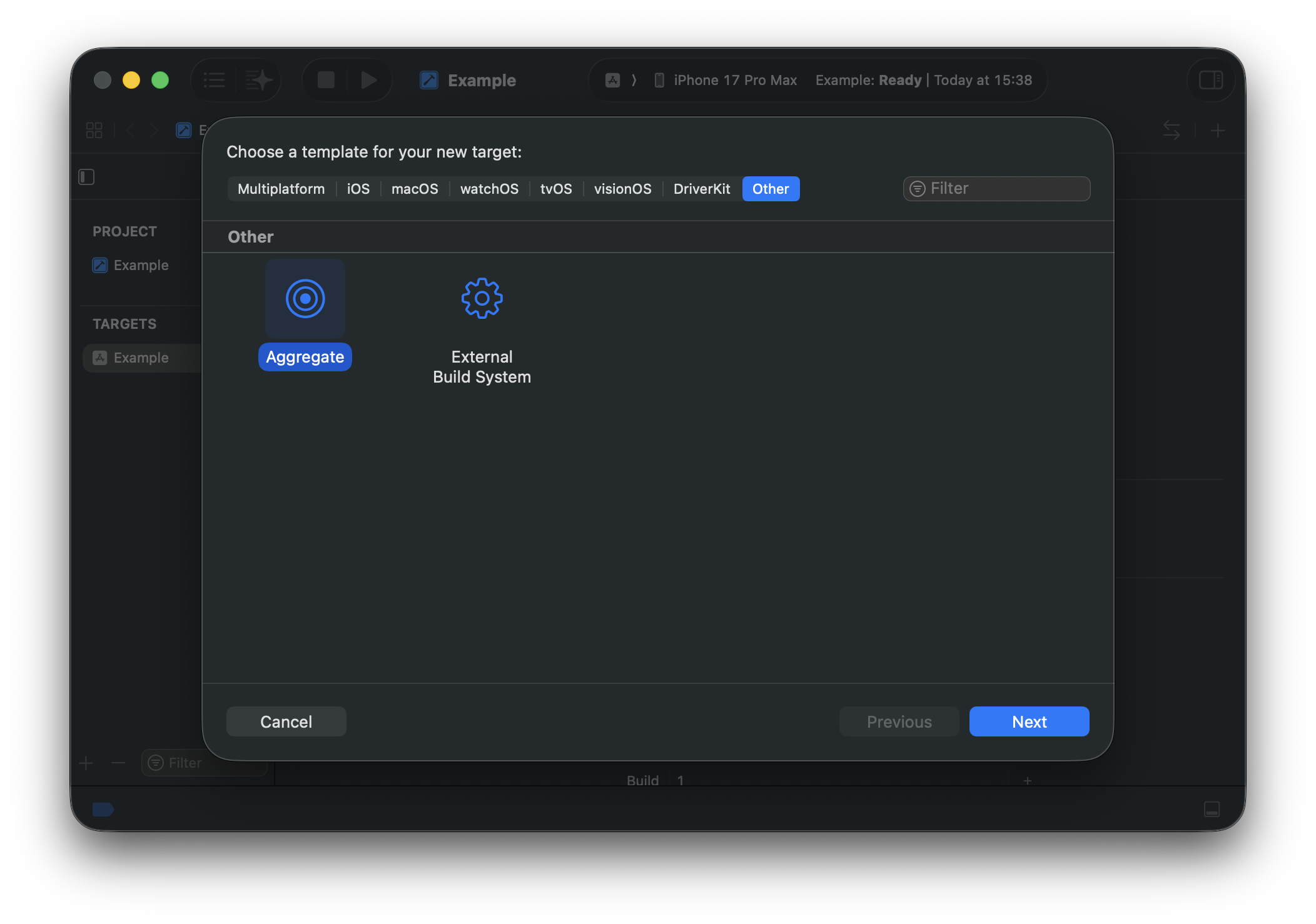
Select your project in the Project Navigator and click the + button at the bottom left of the Targets section. Select Other and choose Aggregate. Hit Next.
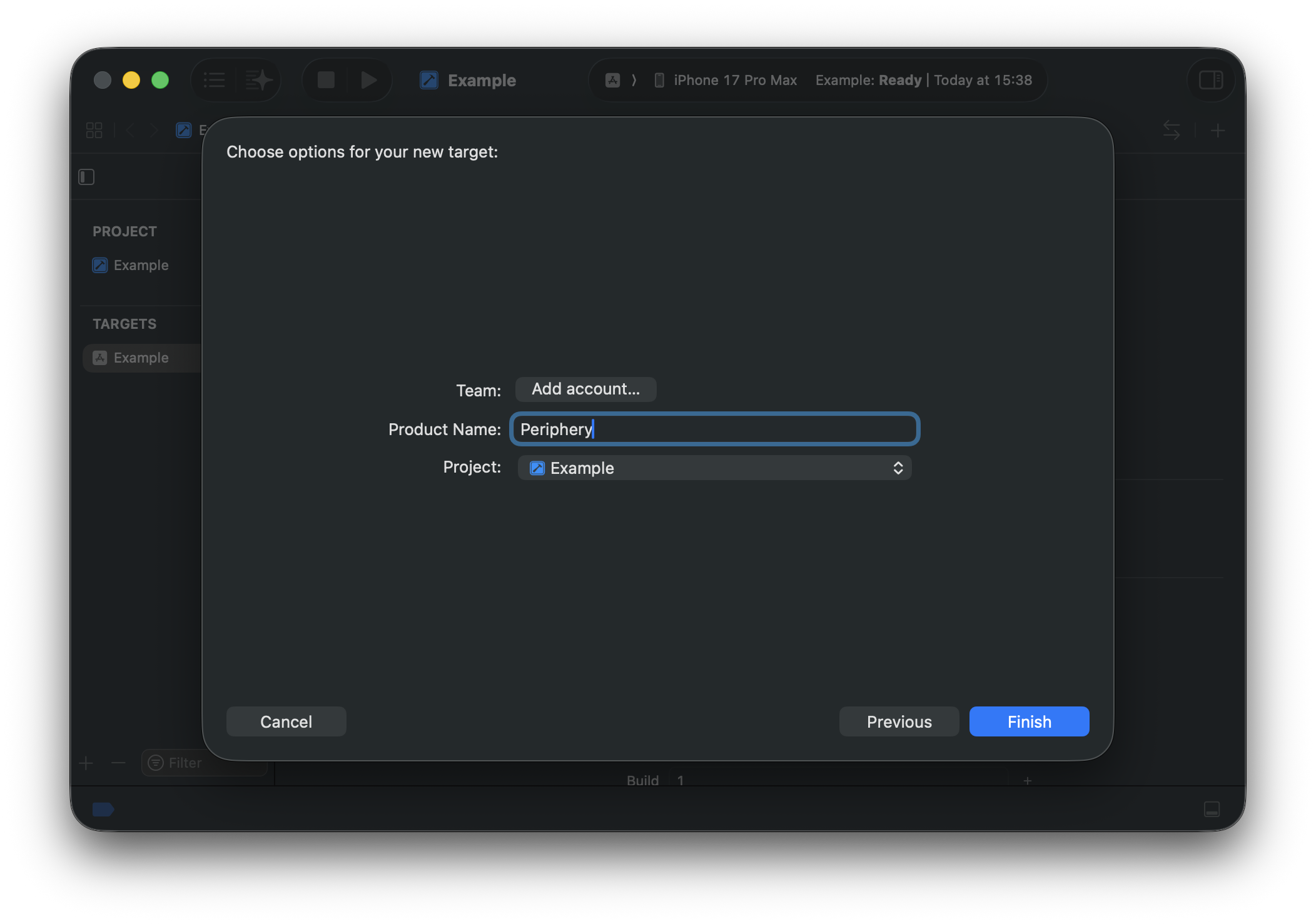
Choose a name for the new target, e.g., "Periphery" or "Unused Code".
Step 2: Add a Run Script Build Phase
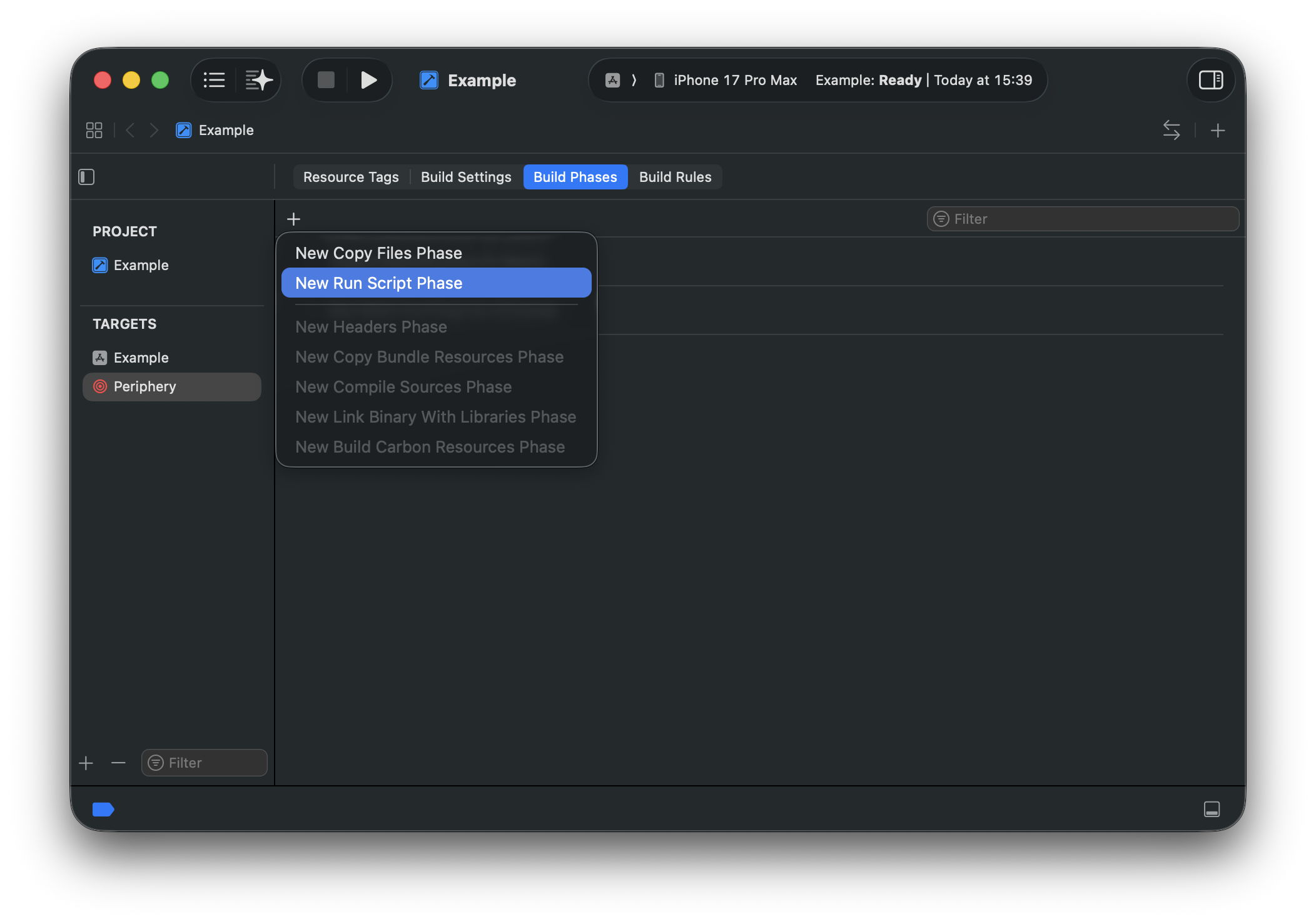
In the Build Phases section, click the + button to add a new Run Script phase.
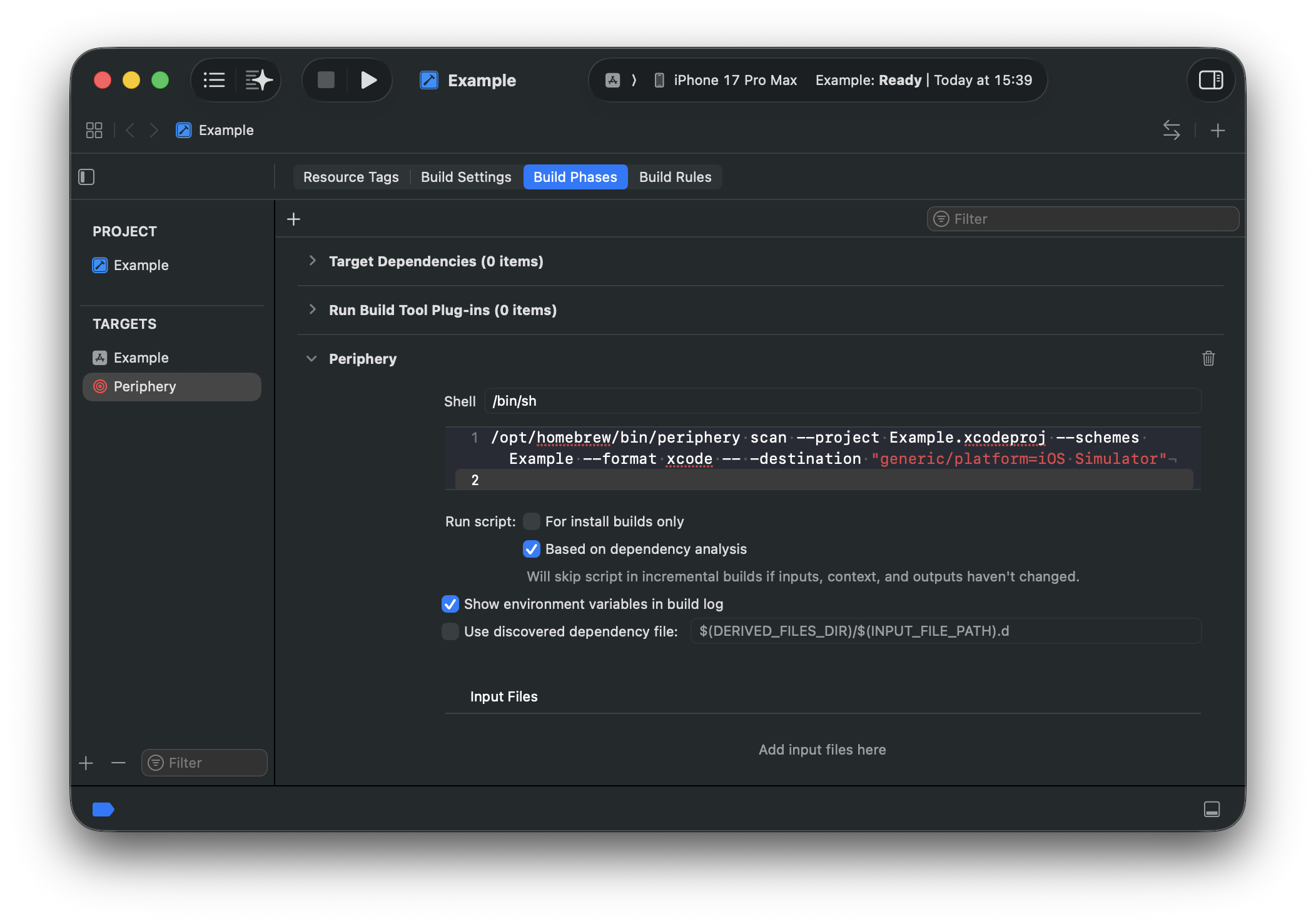
Copy and paste your Periphery command into the script input.
[!TIP]
- Include the
--format xcodeoption to ensure results are always formatted so that Xcode can parse them.- Use the absolute path to
periphery.
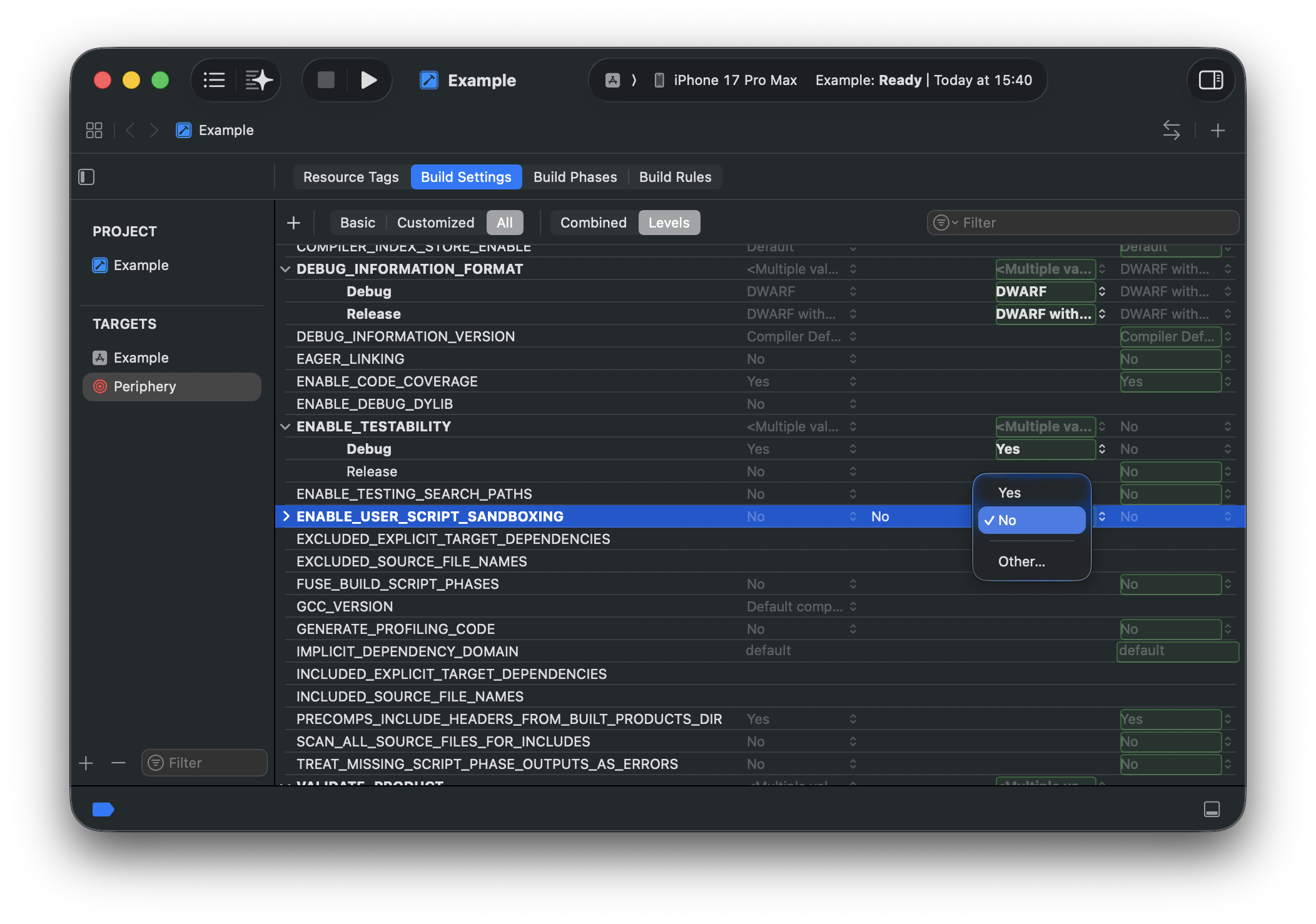
Step 3: Disable User Script Sandboxing
You must disable User Script Sandboxing for the Run Script phase. Periphery requires access to your project's index store and source files, which are blocked by Xcode's default sandbox. To disable sandboxing, set the ENABLE_USER_SCRIPT_SANDBOXING option to No in the Build Settings for the Periphery aggregate target.
Step 4: Select & Run
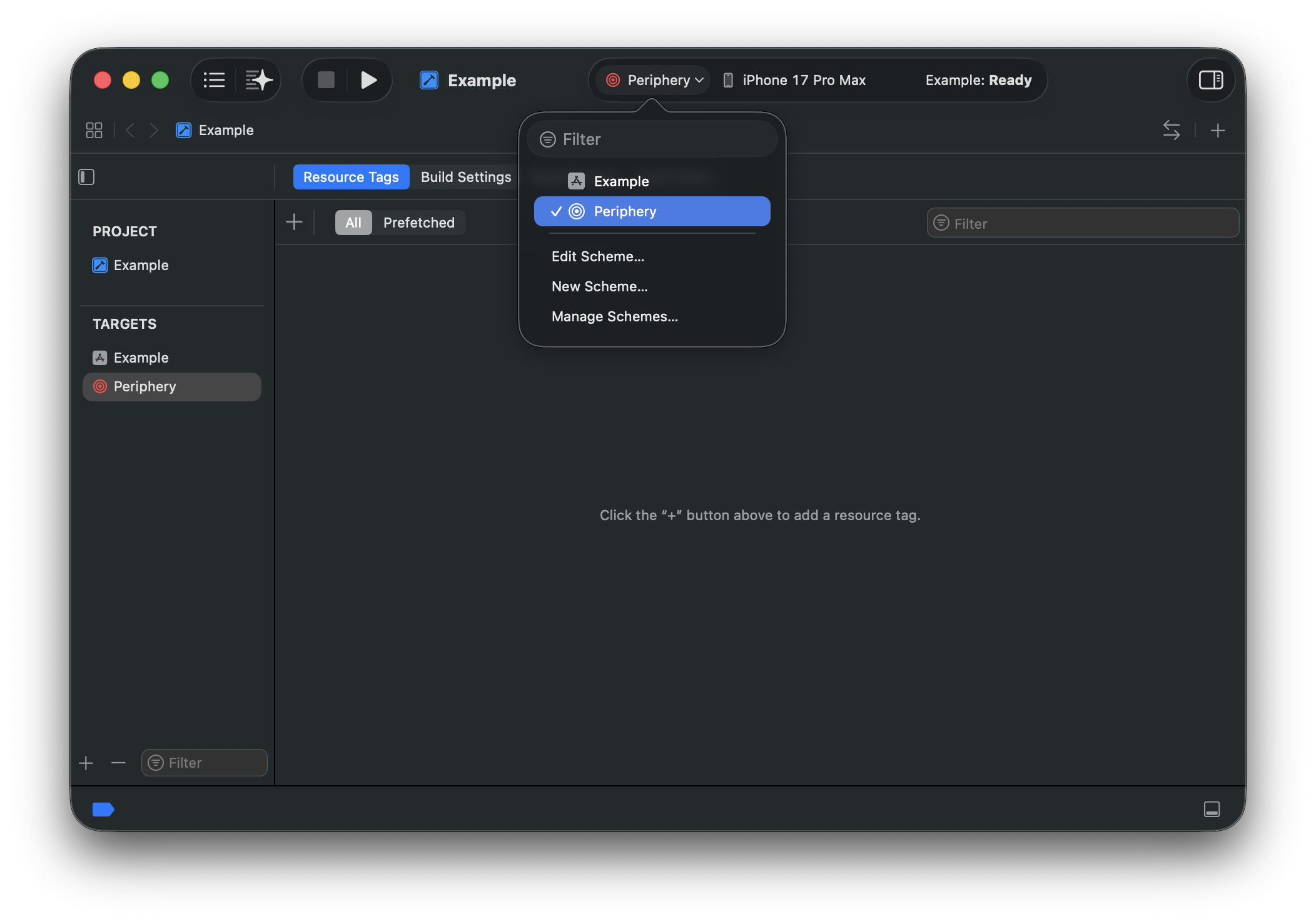
You're ready to roll. You should now see the new scheme in the dropdown. Select it and hit run.
[!TIP] If you'd like others on your team to be able to use the scheme, you'll need to mark it as Shared. This can be done by selecting Manage Schemes... and selecting the Shared checkbox next to the new scheme. The scheme definition can now be checked into source control.
Excluding Files
Both exclusion options described below accept a Bash v4-style path glob, either absolute or relative to your project directory. You can delimit multiple globs with a space, e.g., --option "Sources/Single.swift" "**/Generated/*.swift" "**/*.{xib,storyboard}".
Excluding Results
To exclude the results from certain files, pass the --report-exclude <globs> option to the scan command.
Excluding Indexed Files
Excluding files from the indexing phase means that any declarations and references contained within the files will not be seen by Periphery. Periphery will behave as if the files do not exist.
To exclude files from being indexed, there are a few options:
- Use
--exclude-targets "TargetA" "TargetB"to exclude all source files in the chosen targets. - Use
--exclude-teststo exclude all test targets. - Use
--index-exclude "file.swift" "path/*.swift"to exclude individual source files.
Retaining File Declarations
To retain all declarations in files, pass the --retain-files <globs> option to the scan command. This option is equivalent to adding a // periphery:ignore:all comment command at the top of each file.
Continuous Integration
When integrating Periphery into a CI pipeline, you can potentially skip the build phase if your pipeline has already done so, e.g., to run tests. This can be achieved using the --skip-build option. However, you also need to tell Periphery the location of the index store using --index-store-path. This location is dependent on your project type.
Xcode
The index store generated by xcodebuild exists in DerivedData at a location dependent on your project, e.g., ~/Library/Developer/Xcode/DerivedData/YourProject-abc123/Index/DataStore. For Xcode 14 and later, the Index directory can be found as Index.noindex, which suppresses Spotlight indexing.
SwiftPM
By default, Periphery asks SwiftPM where it places build products (swift build --show-bin-path, honouring the -c/--configuration, --scratch-path, --build-system and --triple options passed after --) and looks for the index store next to them:
- Swift 6.4 and later (default
swiftbuildbackend):<scratch path>/out, e.g..build/out(it containsv5/unitsandv5/records). - The
nativebackend:<bin path>/index/store, e.g..build/debug/index/storeor.build/arm64-apple-macosx/debug/index/store.
Therefore, if you intend to run Periphery directly after calling swift test, you can omit the --index-store-path option, and Periphery will use the index store created when the project was built for testing, provided you pass the same build options (e.g. periphery scan --skip-build -- -c release). If no index store is found, Periphery fails and lists the locations it tried. If the project wasn't built that way, you must provide Periphery the location of the index store with --index-store-path.
Build Systems
Bazel
bazel run @periphery -- scan --bazelAdd --strict to return exit status 1 when the scan finds unused declarations. A scan without findings returns 0.
The --bazel option enables Bazel mode, which provides seamless integration with your project. It works by querying your project to identify all top-level targets, generating a hidden implementation of the scan rule, and then invoking bazel run. You can filter the default top-level target query with the --bazel-filter <value> option, where <value> will be passed as the first argument to Bazel's filter operator. You can also override the generated query entirely with --bazel-query <value>, which is useful when you need to exclude targets such as ones tagged manual, or avoid building targets that use an incorrect transition when built directly. The generated query can be seen in the console with the --verbose option.
Periphery's generated scan rule follows embedded bundle and plugin edges transitively, so you can root the scan in application targets while still analyzing code that is only reachable through extensions, app clips, watch applications, or Swift compiler plugins.
[!TIP] By default, Periphery passes
--check_visibility=falsetobazel runto simplify integration, since the generated scan target references your project's targets which may not otherwise be visible. However, disabling visibility checking can invalidate Bazel's analysis cache, resulting in slower subsequent builds.You can disable this behavior with the
--bazel-check-visibilityoption. You must ensure the necessary targets are visible to Periphery's generated package, for example by adding the@@+generated+periphery//bazel:generatedvisibility label to your targets.
Verify a fork checkout
Install the Bazel version in .bazelversion and make bazel available on PATH. Run the real consumer regression from the fork root:
swift Tests/BazelTests/Verify.swiftThe regression copies the Swift example into a temporary workspace and selects the local fork. It checks that the strict scan reports only unusedGreeting() and returns 1. It then removes that function and checks that the scan returns 0 without findings. The regression removes its temporary workspace after success and preserves diagnostic logs after a failure.
Other
Periphery can analyze projects using other build systems, though it cannot drive them automatically like SPM, Xcode, and Bazel. Instead, you need to create a configuration file that specifies the location of indexstore and other resource files. The format is as follows:
{
    "indexstores": [
        "path/to/file.indexstore"
    ],
    "test_targets": [
        "MyTests"
    ],
    "plists": [
        "path/to/file.plist"
    ],
    "xibs": [
        "path/to/file.xib",
        "path/to/file.storyboard"
    ],
    "xcdatamodels": [
        "path/to/file.xcdatamodel"
    ],
    "xcmappingmodels": [
        "path/to/file.xcmappingmodel"
    ],
    "xcstrings": [
        "path/to/Localizable.xcstrings"
    ]
}
[!TIP] Relative paths are assumed to be relative to the current directory.
You can then invoke Periphery as follows:
periphery scan --generic-project-config config.jsonPlatforms
Periphery supports both macOS and Linux. macOS supports both Xcode and Swift Package Manager (SPM) projects, whereas only SPM projects are supported on Linux.
Troubleshooting
Erroneous results in one or more files, such as false positives and incorrect source file locations
It's possible for the index store to become corrupt or out of sync with the source file. This can happen, for example, if you forcefully terminate (^C) a scan. To rectify this, you can pass the --clean-build flag to the scan command to force removal of existing build artifacts.
Code referenced within a preprocessor macro conditional branch is unused
When Periphery builds your project, it uses the default build configuration, which is typically 'debug'. If you use preprocessor macros to conditionally compile code, Periphery will only have visibility into the branches that are compiled. In the example below, releaseName will be reported as unused as it is only referenced within the non-debug branch of the macro.
struct BuildInfo {
    let debugName = "debug"
    let releaseName = "release" // 'releaseName' is unused

    var name: String {
        #if DEBUG
        debugName
        #else
        releaseName
        #endif
    }
}
You have a few options to work around this:
- Use Comment Commands to explicitly ignore
releaseName. - Filter the results to remove known instances.
- Run Periphery once for each build configuration and merge the results. You can pass arguments to the underlying build by specifying them after
--, e.g.,periphery scan ... -- -configuration release.
Swift package is platform-specific
Periphery uses swift build to compile a Swift package, which will fail if the Swift package is platform-specific (e.g., to iOS).
As a workaround, you can manually build the Swift package with xcodebuild and then use the --skip-build and --index-store-path options to target the index store previously produced by xcodebuild.
Example:
# 1. Use xcodebuild
xcodebuild -scheme MyScheme -destination 'platform=iOS Simulator,OS=16.2,name=iPhone 14' -derivedDataPath '../dd' clean build

# 2. Use produced index store for scanning
periphery scan --skip-build --index-store-path '../dd/Index.noindex/DataStore/'
Known Bugs
Due to some underlying bugs in Swift, Periphery may in some instances report incorrect results.
| ID | Title |
|---|---|
| 56541 | Index store does not relate static property getter used as subscript key |
| 56327 | Index store does not relate objc optional protocol method implemented in subclass |
| 56189 | Index store should relate appendInterpolation from string literals |
| 56165 | Index store does not relate constructor via literal notation |
Credits
This fork includes fixes under the MIT License from tiny-earth-moon/periphery, which tiny-earth-moon maintains as a fork of peripheryapp/periphery. The import uses tag 3.10.0 (commit e267b6b), and Git history keeps each imported commit with its original author.
The table credits the original reports, earlier implementations, and contributors to the imported changes.
Fix credits:
| Fix | Original report | Earlier implementation | tiny-earth-moon change | Contributors |
|---|---|---|---|---|
| Deterministic DerivedData path by sorting schemes before hashing | Issue 1141 by amarcadet |
None | Issue 5, PR 16 | tiny-earth-moon |
Platform-conditional retention for @available(<platform>, unavailable) and #if os() blocks |
Issue 908 by Ernest0-Production |
None | Issue 14, PR 18 | tiny-earth-moon |
SwiftPM index store lookup through swift build --show-bin-path for the Swift 6.4 swiftbuild backend |
Issue 1149 by p-linnane |
None | Issue 2, PR 19 | tiny-earth-moon |
| Xcode synchronized folder membership and exceptions | Issue 1114 by iorecicSA |
None | Issue 6, PR 20 | tiny-earth-moon |
Glob expansion of directories named ** |
Issue 1144 by ZevEisenberg |
PR 1145 by ZevEisenberg |
Issue 4, PR 22 | ZevEisenberg |
xcodebuild -list DerivedData location and --clean-build |
Issue 1146 by lukaskollmer |
PR 1147 by lukaskollmer |
Issue 3, PR 25 | lukaskollmer, tiny-earth-moon |
Regression test for a property wrapper referenced in #if !os(...) |
Issue 1121 by pylapp |
None | Issue 8, PR 27 | tiny-earth-moon |
| Redundant public accessibility analysis for public result builders used from another module | Issue 1112 by juicyfru1t |
None | Issue 10, PR 28 | tiny-earth-moon |
--retain-public for public macros and associated types |
Issue 1131 by rgoldberg |
None | Issue 7, PR 31 | tiny-earth-moon |
| Private Interface Builder members in SwiftPM targets | Issue 1089 by SmallRedGollum |
PR 1096 by ileitch |
Issue 13, PR 32 | tiny-earth-moon |
Tests for SwiftUI @State properties read only through $name or _name with Xcode 27 |
Issue 36 by rishabhtpdl |
None | Issue 36, PR 37 by rishabhtpdl (closed), PR 38 |
rishabhtpdl, tiny-earth-moon |
All implicit result builder entry points, including buildBlock of any arity and buildPartialBlock |
Issue 30 by tiny-earth-moon |
None | Issue 30, PR 39 | tiny-earth-moon |
| Core Data models in SwiftPM targets | Issue 33 by tiny-earth-moon |
None | Issue 33, PR 40 | tiny-earth-moon |
| Redundant public accessibility regression tests | Issue 1111 by juicyfru1t, Issue 1108 by AllDmeat |
None | Issue 11, Issue 12, PR 42 | tiny-earth-moon |
| Regression tests for an ignore comment on the first line of an extension | Issue 1113 by rgoldberg |
None | Issue 9, PR 46 | tiny-earth-moon |
| Code referenced only from previews of used SwiftUI views | Issue 1061 by danwood |
None | Issue 15, PR 47 | tiny-earth-moon |
| Redundant public accessibility analysis for public members in non-public extensions | Issue 45 by tiny-earth-moon |
None | Issue 45, PR 50 | tiny-earth-moon |
ExpressibleByArgument conformances qualified with their module |
Issue 53 by tiny-earth-moon |
None | Issue 53, PR 54 | tiny-earth-moon |
Unused String Catalog (.xcstrings) keys, type-based key detection, and localized_string_catalog_exclude |
Issue 893 by Kaspik |
PR 1029 by ileitch (commit e7b0f206) |
Issue 55, Issue 58, PR 56, PR 59 | ileitch, tiny-earth-moon |
This fork handles SwiftUI @State reads through its SwiftUIRetainer instead of the imported MacroWrappedPropertyReferenceBuilder. It reports a @State property as unused when code assigns it only through _name = State(...) and never reads it, and keeps the imported tests for $name reads, _name reads, and property wrappers. Platform-conditional retention selects one declaration among several with the same name only when the branch states the receiver type. String Catalog analysis matches interpolated literals to format keys and retains keys that may match runtime lookups. It determines catalog ownership from target membership and fails the scan when it cannot read or parse a catalog. Tests build real packages and run real xcodebuild in place of shell stubs and recorded output. This fork does not import the release automation, workflows, issue templates, version and dependency pins, or fork maintenance text from tiny-earth-moon.
Releases
Every pull request into the default branch must have exactly one label from the table below. Classify each pull request by its effect on shipped behavior and compatibility, never by diff size or line count. The "Release label" check fails when a pull request lacks a release:* label, has more than one, or uses an unknown release:* label. Its error message identifies the pull request and the label to add or remove.
Release labels:
| Label | Use when | Example from 3.8.0-agoodkind.7 |
|---|---|---|
release:major |
The change breaks compatibility with the CLI, configuration, or output format or schema. | 4.0.0-agoodkind.1 |
release:minor |
The change adds a compatible new capability. | 3.9.0-agoodkind.1 |
release:patch |
The change makes a compatible fix, including a corrected finding or a false-positive fix. | 3.8.1-agoodkind.1 |
release:none |
The change does not affect shipped behavior, such as changes limited to documentation, tests, CI, or release tooling. | No release |
Versions use MAJOR.MINOR.PATCH-agoodkind.N and compare numerically: 3.10.0 is newer than 3.9.0.
The release workflow runs on every push to the default branch. If an automatic run starts with a different commit from the default branch, the run requests a new workflow and stops before release work. An explicit tag retry uses the requested tag. The workflow considers every pull request merged since the newest complete published release that is an ancestor of the source commit. The highest release label determines one bump for the entire release, never one bump per commit. Several release:patch pull requests produce one patch bump. The workflow does not publish a release when every pull request in that range uses release:none.
Before building, the workflow reserves the new version by pushing the Git ref refs/release-reservations/<version> at the source commit. It creates and verifies the release tag at that commit. Creating a reservation or tag does not publish a release. New versions start above every existing tag and reservation, and two commits never receive the same version.
A retry reuses the commit's tag or reservation, even when another commit reserved or published a newer version in between. If the retry publishes a version older than the newest complete published release, it does not make that version the latest GitHub release or change the Homebrew formula. Published tags and their assets never change.
Sponsors 
Support maintenance of this free, offline fork through GitHub Sponsors.
Special thanks go to the following generous sponsors:
SaGa Corp
SaGa Corp develops unique technology for financial players and their customers.

Emerge Tools
Emerge Tools is a suite of revolutionary products designed to supercharge mobile apps and the teams that build them.

About
A tool to identify unused code in Swift projects. This is the Forever Free Fork
@agoodkind/periphery
Languages
Maintainers
Versions
3.9.12-agoodkind.12026-11-16 |